

It’s 1:15 on a Tuesday and your tech is sitting in the driveway at the Hendersons’ with the diagnostic fee already in his head, texting you “nobody’s home.” Third one this week. You booked that slot four days ago, held it against two other calls, and now it’s an hour of drive time, a tank of gas, and a tech standing on a porch for a job that isn’t going to happen. Worse, the guy you turned away Monday because you were full? He called someone else.
That’s a no-show, and in a busy shop they add up quietly until you’re running a truck half-empty through the exact weeks you can’t keep up. Here’s the thing nobody tells you: most no-shows aren’t people blowing you off. They forgot. The spouse who booked it didn’t tell the one who’s home. The window you gave was so wide they gave up waiting and ran to the store. Every one of those is fixable, and none of the fixes cost you a dollar in ad spend. You already won the job. This is about not losing it between the booking and the truck pulling up.
This piece lays out the full confirmation system: the exact touches from the second a job hits the board to the moment your tech knocks, the real text copy you can paste in today, the timing that works, and the part nobody writes down, which is how each step breaks and what to do about it. It’s the same discipline a good dispatch desk runs on, turned into a sequence that fires on its own.
On this page
- What is an HVAC appointment confirmation system?
- What a no-show actually costs you
- Why booked jobs fall apart before the truck arrives
- The 6-touch confirmation system
- The steal-this message pack
- Run it for three different shops
- Staying legal: TCPA and 10DLC on reminders
- Objections, answered straight
- Frequently asked questions
What is an HVAC appointment confirmation system?
An HVAC appointment confirmation system is the fixed sequence of automatic messages a shop sends between the moment a job is booked and the moment the tech arrives, designed to confirm the appointment, set the arrival window, reduce no-shows, and recover the ones that slip, without anyone on your team having to remember to pick up the phone. It is not the single “see you Thursday” call your office person squeezes in between dispatching trucks. It is a scheduled cadence tied to the job on the board, so every appointment gets the same treatment whether you booked 4 jobs that day or 40.
The difference matters because confirming by hand does not scale. On a good week in cooling season a five-truck shop books dozens of calls, and nobody hand-dials every one of them the day before. So the confirms that get made are the big installs somebody remembered, and the $89 tune-ups ride on hope. A system fixes that the way a dispatch board fixes job flow: every appointment has a status, a timer, and a next touch, so nothing falls through just because the phone wouldn’t stop ringing.
It does three jobs at once. It reassures the customer the appointment is real and tells them exactly when to expect you, which kills the “I didn’t think you were still coming” cancellation. It gives them an easy, low-friction way to confirm or reschedule, so the ones who can’t make it tell you in advance instead of ghosting. And it keeps your schedule honest, because a confirmed board is a board you can plan routes and overtime against. Do those three on autopilot and your no-show rate drops, your trucks stay full, and your office person gets an hour of their day back.
What a no-show actually costs you
Owners wave off no-shows as part of the business until they run the math. Say you book 150 service appointments a month and 10% ghost you. That’s 15 wasted slots. Put even a conservative $250 of drive time, tech hour, and lost opportunity on each one, the low-to-mid end of what trades analysts report, and you’re bleeding roughly $3,750 a month, or $45,000 a year, on jobs you already won. That number doesn’t count the callers you turned away because the board looked full, or the install quote that never happened because the maintenance visit that would have surfaced it never ran.
The reduction is the part that should make you move. A behavioural-insights unit inside the New South Wales government ran reminders against a real no-show problem and cut missed appointments by 33.7%, and the messages that worked best named the cost of a missed visit right in the text (NSW Government). That was healthcare, not HVAC, but the behaviour is identical: a person forgets, a timely nudge with a clear ask pulls them back. Trades-focused analysts report shops knocking their no-show rate from the low teens down to single digits inside a month once a confirmation sequence is running (Enterprise DNA). Those are vendor and consultant figures, not an audited study, so treat them as direction rather than gospel, but the direction is not in doubt.
Here’s the quiet kicker. You’re probably already paying someone to make confirmation calls, and it’s the channel the fewest people want. In that same survey of nearly 14,000 people, 48% preferred a text, 29% preferred a phone call, and 21% preferred email (Phreesia). Your office person is spending real hours on the least effective method. Move that effort to text and you get a higher confirm rate for a fraction of the labor.
Why booked jobs fall apart before the truck arrives
You can’t write confirmation copy that works until you know what you’re fighting. In residential HVAC a no-show almost always traces to one of three things, and none of them is “the customer is a flake.”
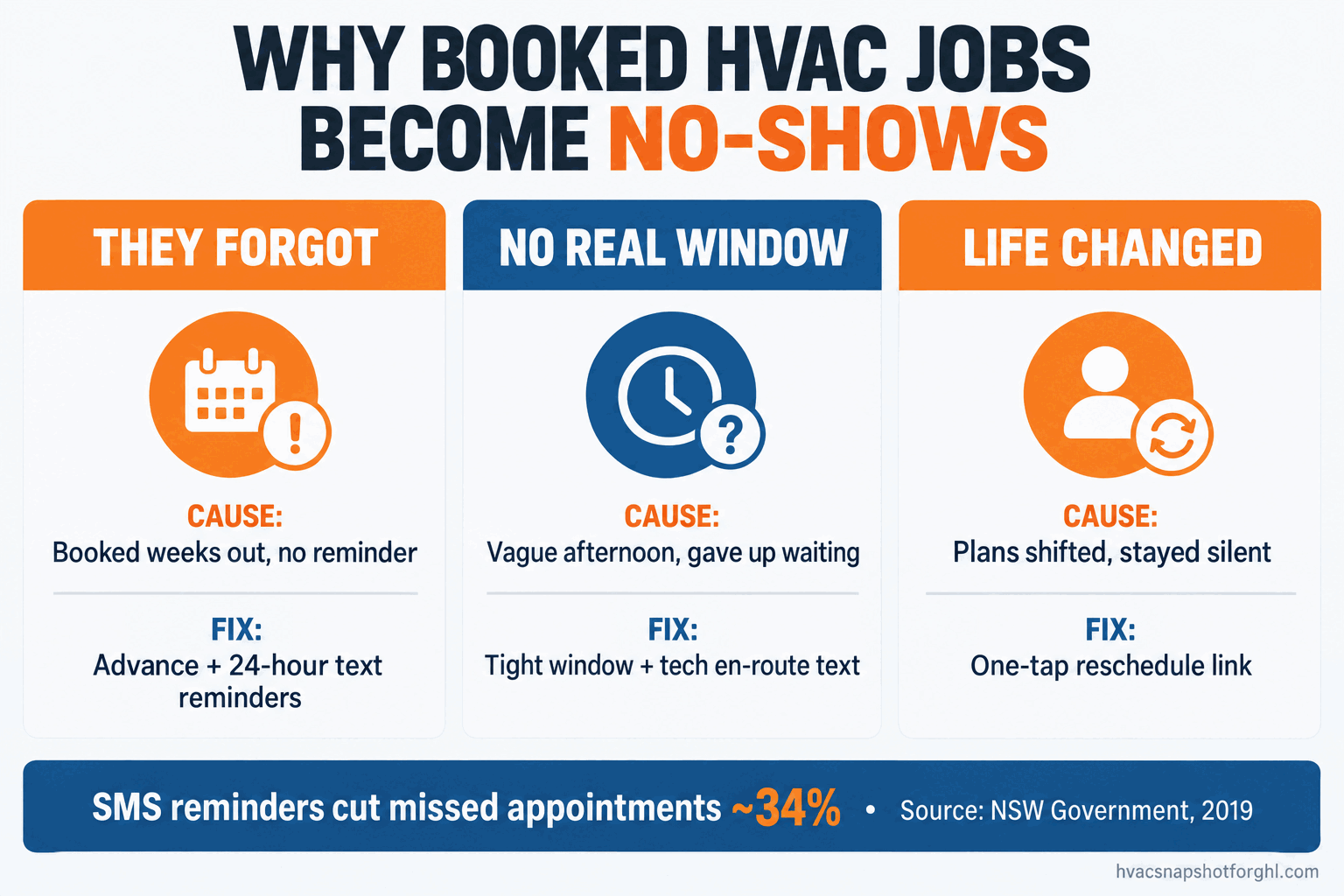
They forgot. Somebody booked a tune-up two weeks out, put nothing in the calendar, and the day arrived with zero memory of it. This is the single biggest cause and the easiest to kill, because a reminder is literally the fix. The further out the booking, the higher the forget rate, which is why maintenance visits and seasonal tune-ups no-show more than same-day emergency calls.
They never got a real window. You said “Thursday afternoon” and the customer heard “sometime between noon and dark.” So they ran to the store at 2, figured you weren’t coming, and weren’t there at 3:30 when your tech rolled up. A no-show that is actually a window problem reads as the customer’s fault but it’s a communication gap on your end. Tightening the window and texting a real “on the way” updates it out of existence.
Life changed and they didn’t tell you. The AC started working again so the urgency faded. A kid got sick. Work ran long. These were never no-shows waiting to happen, they were reschedules that needed an easy exit. Give the customer a one-tap way to move the appointment and most of them will, instead of just not answering the door and leaving you to guess.
The 6-touch confirmation system
Here’s the cadence. Six touches from booking to knock, each with a job, the real copy, the timing that works, and how it breaks. Every touch stops the instant the customer confirms, reschedules, or opts out, and the whole thing runs off the appointment status on your board.
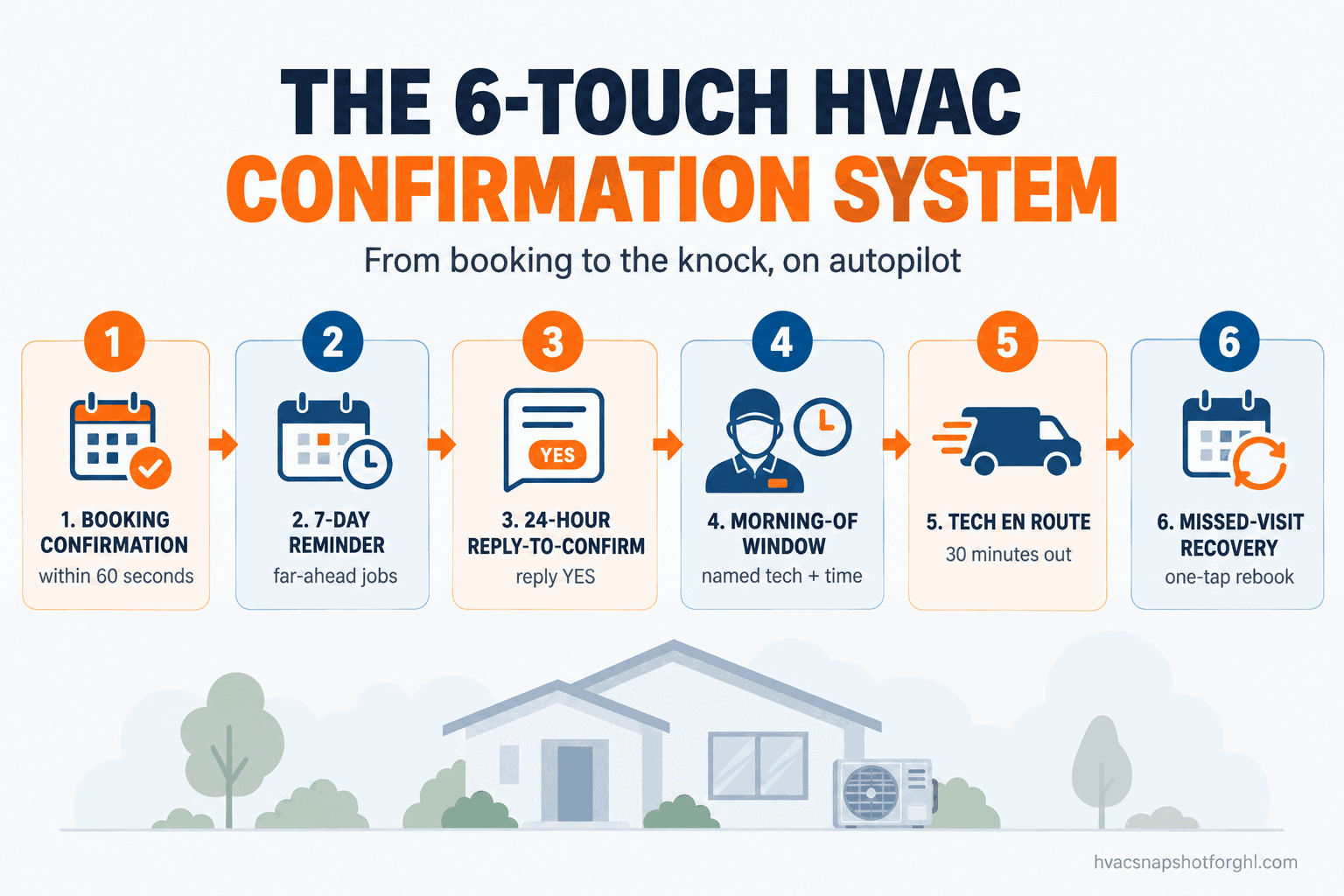
Touch 1: The instant booking confirmation (within 60 seconds)
The second a job hits the board, whether it came from a call, your online booking form, or a chat widget, the customer gets a text that confirms the appointment in writing. This does two things. It proves the booking is real, which matters most for the jobs people book online and then quietly doubt. And it opens the text thread you’ll use for every touch after, which is also where you capture the consent you need to keep texting them.
How it breaks: the confirmation fires from the wrong number, so when the customer replies “can we do Friday instead” it lands in a voicemail nobody checks. Every message in this system has to come from a real, monitored number that routes replies to whoever runs the board. A send-only number turns your confirmation system into a complaint generator.
Touch 2: The 7-day advance reminder (for anything booked a week or more out)
Maintenance visits, seasonal tune-ups, and installs scheduled well ahead are where the forgetting happens. A week out, you send a short reminder that re-states the date and gives a one-tap reschedule. The NSW trial that cut no-shows by a third sent its first nudge seven days ahead for exactly this reason (NSW Government). Skip this touch for same-day and next-day calls, they don’t need it.
How it breaks: you send it to same-day emergency calls too, and now the customer whose AC died this morning gets a “reminder” for an appointment they booked an hour ago. It reads as a broken robot. Gate this touch so it only fires when the booking is five or more days out.
Touch 3: The 24-hour reply-to-confirm (the day before)
This is the workhorse. The day before, the customer gets a text with the date, the window, and a clear ask: reply YES to confirm or call to reschedule. The reply is the gold. A customer who taps YES has re-committed, and the ones who don’t reply get flagged for a live call. You’ve turned a wall of appointments into two piles: confirmed, and needs-a-human. Your office person now spends their confirmation hour only on the handful that didn’t answer, instead of dialing all of them.
How it breaks: you ask for a confirm but do nothing with a non-reply, so the flag is cosmetic. The whole point is that silence triggers an action, a call or a second text, not a shrug. Wire the non-reply path or you’ve just sent a nicer reminder.
Touch 4: The morning-of window text (day of service)
The morning of the appointment, the customer gets their arrival window and a name. “Your tech Marcus is scheduled between 1 and 3 today.” A named tech and a tighter window do more for show rate than anything else here, because the vague-window no-show dies when the customer knows roughly when and who. If you can narrow the window as the day firms up, narrow it.
How it breaks: you promise a two-hour window your dispatch can’t hold, the tech rolls up at 4:30 for a 1-to-3 slot, and you’ve trained that customer to ignore your windows forever. A window you can’t keep is worse than a wide one you can. Only commit to what the board can actually deliver.
Touch 5: The tech-en-route text (30 to 45 minutes out)
When the tech clears the prior job and heads your customer’s way, an automatic “on my way, about 30 minutes out” text goes. This is the one that eliminates the window no-show entirely, because now the customer has a real-time countdown. It’s also the touch customers rave about, the one that makes a two-truck shop feel like a company with a call center. Pair it with the tech’s first name and, if your system supports it, a live ETA.
How it breaks: it fires on every job including the ones running two hours behind, so the customer who got “30 minutes out” at 1:00 is fuming by 3:00. The en-route text has to fire off the tech actually leaving, not off a scheduled time. If you can’t tie it to a real departure, a dispatcher taps it manually. Don’t automate a promise you can’t time.
Touch 6: The same-day reschedule and recovery flow
Despite all of it, some will still not be there. The recovery flow is what separates a lost slot from a saved one. The moment a tech marks “no-answer” or “not home,” an automatic text goes out: sorry we missed you, tap here to grab the next opening. A no-show that rebooks the same week is a schedule hiccup. A no-show that disappears is a dead job and often a bad review. This touch, plus a quick review request on the jobs that did complete, is how you close the loop on the day.
How it breaks: the recovery text blames the customer. “You missed your appointment” reads as a scolding and kills the rebook. Keep it warm and make the next step one tap. The goal is the reschedule, not being right about whose fault it was.
The steal-this message pack
Here’s the copy. Paste it in, swap the brackets for your shop’s details, and keep it plain. Every outbound message carries an opt-out because the law requires it and because it builds trust. Keep each one short enough to read on a lock screen.
Notice what’s not in there: a coupon, a “book now and save,” a review ask stapled to the reminder. That’s deliberate, and the next section on compliance explains why mixing a sell into these texts is the fastest way to turn a legal reminder into a message that needs a whole different consent.
Run it for three different shops
The same six touches scale up and down. What changes is how much runs on autopilot versus a human tapping a button.
The solo and two-truck shop
You’re the dispatcher, and probably the tech. You cannot hand-send confirmations between jobs, so the forgot-and-window no-shows hit you hardest. Start with Touches 1, 3, and 5: instant confirm, 24-hour reply-to-confirm, and the en-route text you fire from your phone when you leave the last job. That’s 80% of the value for almost no setup. The reply-to-confirm matters most for you, because it tells you which of tomorrow’s jobs are solid before you plan your route and which to call tonight so you don’t burn a morning driving to an empty house.
The mid-size shop, five to eight trucks
This is where the system earns its keep. You’ve got an office person spending real hours on confirmation calls and a board too full to hand-manage. Run all six touches automatically, tie the en-route text to your dispatch so it fires on real departures, and reroute your office person from dialing everyone to working only the non-replies and the recovery flow. Your no-show rate is where the money is: knock a 12% rate down to 6% across 150 jobs and you’ve handed yourself nine full slots a month back, plus the hour a day your office person stops spending on calls nobody wanted anyway.
The twelve-to-fifteen-truck operation
At your volume a half-point of no-show rate is a truck’s worth of revenue, and you’re competing with the private-equity rollup across town that already runs this. Everything is automated and tied to live dispatch, the en-route text carries a real ETA, and the recovery flow routes a missed visit straight back onto the next open slot without a human touching it. The win here isn’t just saved slots, it’s a schedule clean enough to plan overtime and routing against, because a board full of confirmed, window-set jobs is a board you can run tight. This is also the volume where per-tech software pricing starts to punish you for growing, which is worth a hard look.
Staying legal: TCPA and 10DLC on reminders
Good news first: appointment reminders are the easy case. Under the TCPA, a straight reminder, confirmation, or en-route text is treated as a transactional or informational message, which sits under a lower consent bar than marketing. When a customer hands you their cell number to book a service call and you’re texting them about that service call, you’re on solid ground. You still need the basics: a logged record of consent, and a working opt-out in every message, which is why STOP lives in the copy above.
The trap is the upsell. The moment you add a sell to a reminder, “confirming your tune-up tomorrow, and get 10% off a maintenance plan,” it stops being transactional and becomes marketing, which needs prior express written consent, a different and higher standard. Keep your reminders clean and your offers in a separate, opted-in stream. The FCC’s 2026 rules actually reward this split: a customer can opt out of your marketing and still get appointment reminders, fraud alerts, and the like, because those are informational, but only if you’ve kept the categories separate in the first place (McGuireWoods). Legal guidance is to define your informational categories clearly so an opt-out of one doesn’t nuke the rest (Latham & Watkins).
Then there’s 10DLC. If you’re texting customers from a regular business number in the US, carriers require you to register that number under A2P 10DLC or your texts quietly get filtered and never arrive. Registration is cheap, roughly a one-time fee plus a few dollars per campaign a month, but it’s not optional, and an unregistered number means your beautiful confirmation system is talking to a wall. We cover the full setup in the 10DLC and TCPA guide and the consent and opt-in language piece. None of this is legal advice, and the rules shift, so when in doubt check the current FCC order or ask your attorney.
Objections, answered straight
“Won’t customers find all these texts annoying?”
They’d find a wall of marketing annoying. These aren’t that. Each one tells the customer something they actually want to know: you’re booked, here’s your window, your tech’s on the way. People overwhelmingly prefer this over a phone call, 48% to 29% in the Phreesia survey (Phreesia), and the en-route text is the single thing customers compliment most. Annoying is five “you still want this?” texts with no information. Helpful is a countdown to the tech knocking. Keep them informational, cap the count, and give a one-tap opt-out, and the complaints don’t come.
“I already pay for field-service software. Doesn’t it do this?”
Partly, and that’s the catch. Most platforms can fire a basic reminder, but few run a full tagged cadence with a reply-to-confirm that triggers a live-call fallback, an en-route text tied to real departures, and a same-day recovery flow, out of the box. The capability often exists buried in a settings menu nobody built out. If your current tool does all six touches and you’ve actually turned them on, you don’t need another thing, you need to go switch them on. Most shops find half of it dark.
“I call to confirm. Isn’t that enough?”
It’s the least effective channel and the most expensive. A call interrupts the customer, often goes to voicemail, and eats your office person’s afternoon. Text gets read in three minutes (Omnisend), gets a one-tap confirm, and sorts your board for you. Keep the live call, but aim it only at the handful who didn’t reply to the text. You’ll confirm more jobs in less time.
“My techs won’t want to deal with the en-route text.”
They don’t have to. The en-route text fires off dispatch or off a single tap when the tech clears a job, not off anything the tech has to write. If it’s automated to real departures, the tech does nothing at all. The one thing to avoid is making a tech type a message mid-route, which is both unsafe and won’t happen. Tie it to the system, not to the tech’s thumbs.
“Half my customers are older and don’t text.”
Fewer than you think, and the system handles it. The confirmation cadence routes anyone who hasn’t opted into text to your live-call fallback, so the customer who prefers a phone call still gets one, you’ve just shrunk that pile to the people who actually want it. Text-first doesn’t mean text-only. It means you stop spending phone hours on the 48% who’d rather have gotten a text anyway.
Where this sits in the bigger picture
A confirmation system is one piece of plugging the leaks between a ringing phone and money in the bank. It protects the jobs you’ve already booked. Upstream of it, you’ve got to catch the calls in the first place, which is the after-hours and missed-call problem and the speed-to-lead race. Downstream, the completed visit should roll into a same-day invoice and text-to-pay so the ticket doesn’t sit unbilled. Confirmation is the middle link, and a broken middle link means all the money you spent winning the call leaks out before the tech ever arrives.
Frequently asked questions
How do text reminders reduce HVAC no-shows?
They solve the three real causes: forgetting, vague arrival windows, and life getting in the way. A reminder jogs the memory, a window and an on-the-way text tell the customer exactly when to be home, and a one-tap reschedule gives the ones who can't make it an easy exit instead of just not answering the door. A government behavioural-insights trial cut missed appointments by about 34% using well-timed SMS reminders alone.
How many reminders should I send before an HVAC appointment?
Plan for up to six touches from booking to arrival: an instant booking confirmation, a 7-day advance reminder for jobs booked a week or more out, a 24-hour reply-to-confirm, a morning-of window text, a tech-en-route message, and a same-day recovery text if the customer isn't home. Skip the 7-day touch for same-day and next-day calls, they don't need it.
Should I text or call to confirm appointments?
Lead with text and keep calls for the non-responders. In a survey of nearly 14,000 people, 48% preferred text reminders versus 29% for a phone call and 21% for email. Text gets read within minutes, gets a one-tap confirm, and sorts your schedule automatically, so your office person only has to call the handful who didn't reply.
Is it legal to text HVAC customers appointment reminders?
Yes, when you have consent and a working opt-out. Appointment reminders are treated as transactional messages under the TCPA, a lower bar than marketing, so texting a customer about the service call they booked is on solid ground. You need a logged record of consent, a STOP opt-out in every message, and your number registered for A2P 10DLC so carriers deliver the texts. Adding a coupon or offer reclassifies the message as marketing, which needs stricter written consent.
What's the best time to send an HVAC appointment confirmation text?
Send the booking confirmation within a minute of booking, the advance reminder about 7 days out for far-ahead jobs, the reply-to-confirm roughly 24 hours before, the window text the morning of, and the en-route text when the tech actually leaves the prior job. Keep all of it inside normal daytime hours, generally 8am to 9pm local time.
What should a tech-on-the-way text say?
Short and specific: the tech's first name, your shop name, and a real time estimate, such as on the way, about 30 minutes out. It works because it gives the customer a real-time countdown, which eliminates the vague-window no-show. The key is to fire it off the tech's actual departure, not a scheduled time, so you never promise 30 minutes on a job running two hours behind.
How much can a confirmation system save a small HVAC shop?
It depends on your volume and current no-show rate, but the math moves fast. A shop booking 150 jobs a month that cuts its no-show rate from 12% to 6% saves about nine slots a month, plus the office hours that used to go into confirmation calls. At a conservative $250 of direct cost per no-show, that's real money recovered from jobs you'd already won.
It’s Tuesday again, and your tech is pulling up to the Hendersons’. Except this time they booked it, got the confirmation, tapped YES yesterday, saw the window this morning, and got the “30 minutes out” text while they were deciding whether to run to the store. They waited. The door opens before he knocks. That’s not a bigger office team or a slicker pitch. It’s the same jobs you were already booking, finally making it all the way from the board to the knock. The only question is how many of this week’s slots are confirmed, and how many are still just hope.